Links labeled 'Affiliate Link' may earn me commissions — at no extra cost to you. I decide what's worth recommending primarily based on hands-on use, backed by real technical experience and business judgment built in the real world, not a classroom. I don't put an affiliate link on anything I haven't personally used — if I've researched something and think it's solid but haven't run it myself, it still gets recommended, just without a commission link. Not everything I recommend has an affiliate link — if it's the best option for you, I'll point you to it either way. Content — including text, images, and voiceovers — is created with AI assistance. Here's the deal: my goal is to solve real problems for you — because that's the only version of this that works. Bad recommendations burn trust fast. Good ones compound it. My incentive and yours point the same direction: you need it to actually work. When it does, you come back — and that's how I keep the lights on. So helping you isn't the generous thing to do. It's the only thing that makes sense.

MouseClickTutorials.com
Teaching people how to make websites...
...and how to make websites make money!

.
How to Make WordPress Websites and YouTube Videos
💻 1. Setup > A. Domain / B. Hosting / C. Point Domain / D. WP Users / E. Domain Based Email
💻.2. Explore > A. WP Dashboard / B. Settings / C. Themes / D. Plugins / E. Widgets
💻.3. Build > A. Pages & Posts / B. Nested Pages / C. Cats & Tags / D. Menus / E. Try Bricks Builder
💻.4. Create > A. LLMs & GenAI / B. Envato Elements / C. AI Voiceovers / D. AI Music / E. Video Editing
1. Setup > B. Hosting
1. Setup > B. Hosting
Mouse Click Highlights
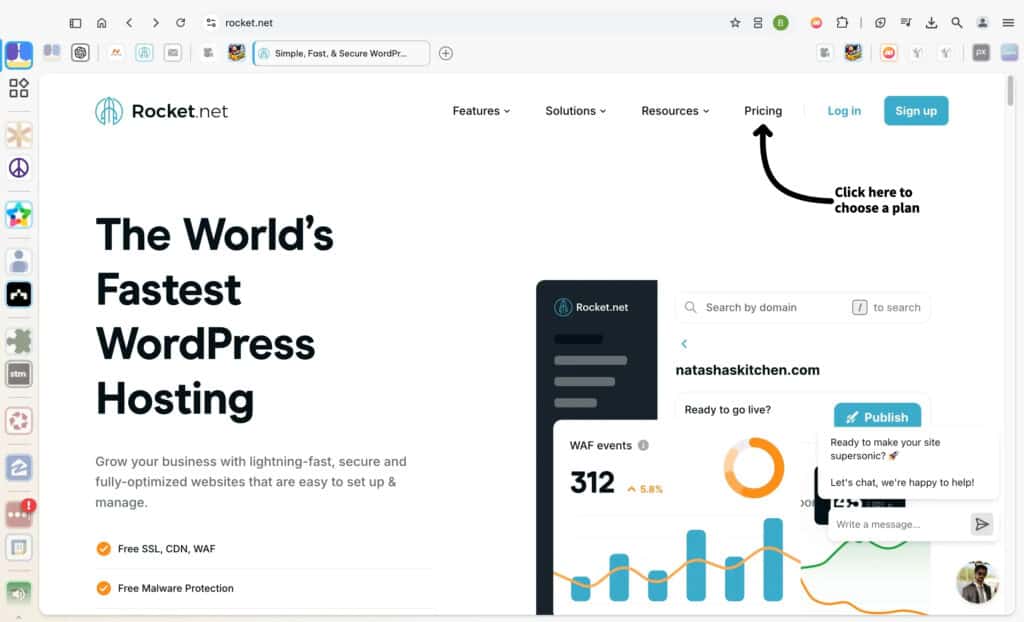
On the Rocket.net homepage, locate the top navigation menu. Click on the “Pricing” link, as shown in the screenshot with the arrow. This will redirect you to the pricing page, where you can explore and review the hosting plans available for your needs.
The Pricing section provides detailed information about each plan, making it easy to choose one that matches your website’s goals, whether it’s a simple project or a high-traffic platform.
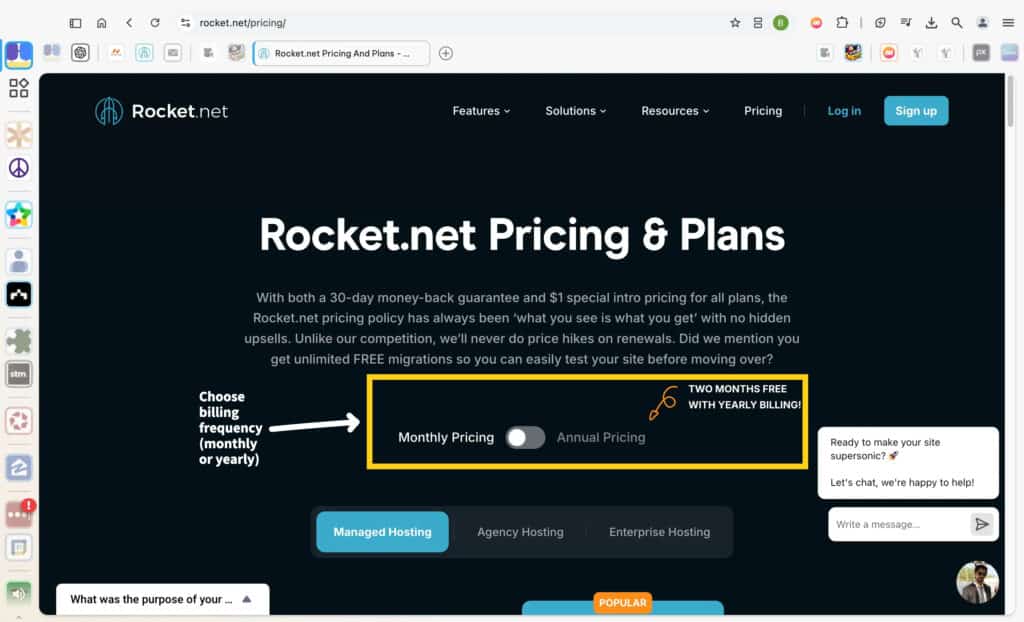
On the Pricing page, locate the toggle option to choose between monthly and annual billing. Switch to “Annual Pricing” if you want to take advantage of the two months free promotion, as highlighted in the yellow box. This decision will directly affect your payment frequency and potential savings.
Rocket.net offers transparent pricing without hidden fees, so you can confidently select the plan and billing cycle that best aligns with your budget and goals.
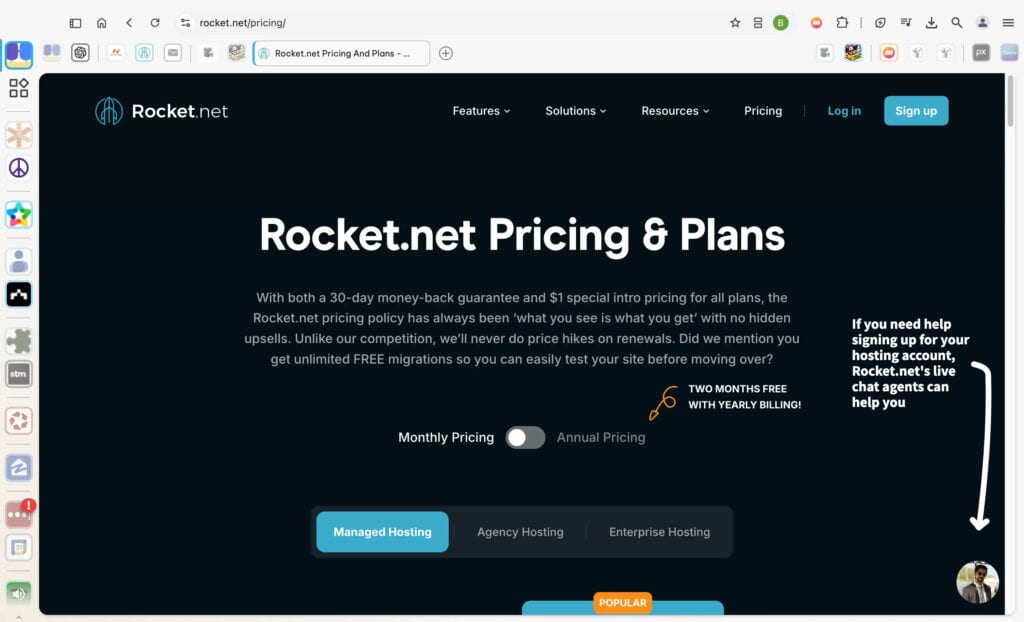
If you encounter any issues or have specific questions during the sign-up process, Rocket.net offers a live chat option for support. The chat icon is located at the bottom-right corner of the screen, as highlighted in the screenshot. This feature is ideal for those who might need clarification or additional guidance.
For most users, the sign-up process is straightforward and primarily involves entering billing information. However, the live chat is there as an extra resource if needed, ensuring that any concerns can be resolved quickly.
Rocket.net makes it easy to choose a hosting plan based on what you need now, with options that scale as your site grows.
If you’re starting with one website, the Starter plan gives you everything required for a smooth, fast, and secure experience. With unmetered visitors and 10GB of storage, it’s perfect for personal projects, blogs, or small businesses. You get the performance benefits of a premium hosting service without overcommitting.
The Pro plan is ideal if you’re managing multiple websites or planning to expand soon. Supporting up to three sites with 20GB of storage, it’s a practical choice for those juggling a few projects or expecting more traffic as they scale.
The Business plan steps it up further, offering hosting for up to ten websites with 40GB of storage. It’s great for businesses, growing agencies, or anyone managing a larger online presence where scalability and reliability are priorities.
Rocket.net also offers an Expert plan for websites requiring much higher capacity, such as those with very high traffic or demanding e-commerce needs…
…Most sites don’t need this level of hosting right away, and it’s not included in the comparison table for simplicity. If your needs ever grow to this level, upgrading is always an option.
No matter which plan you choose, all options come with Rocket.net’s built-in optimizations for WordPress, so you don’t have to stress about the technical side of hosting. Review the comparison table to see what fits your goals today, knowing you can always upgrade later if your needs change.
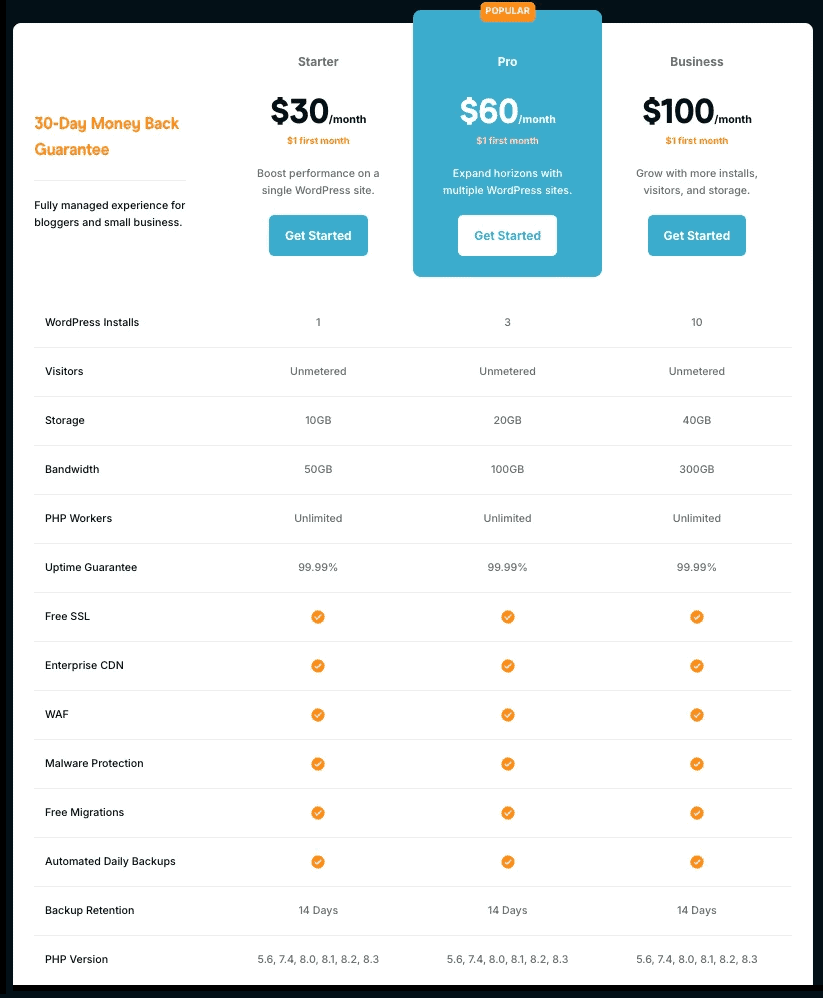
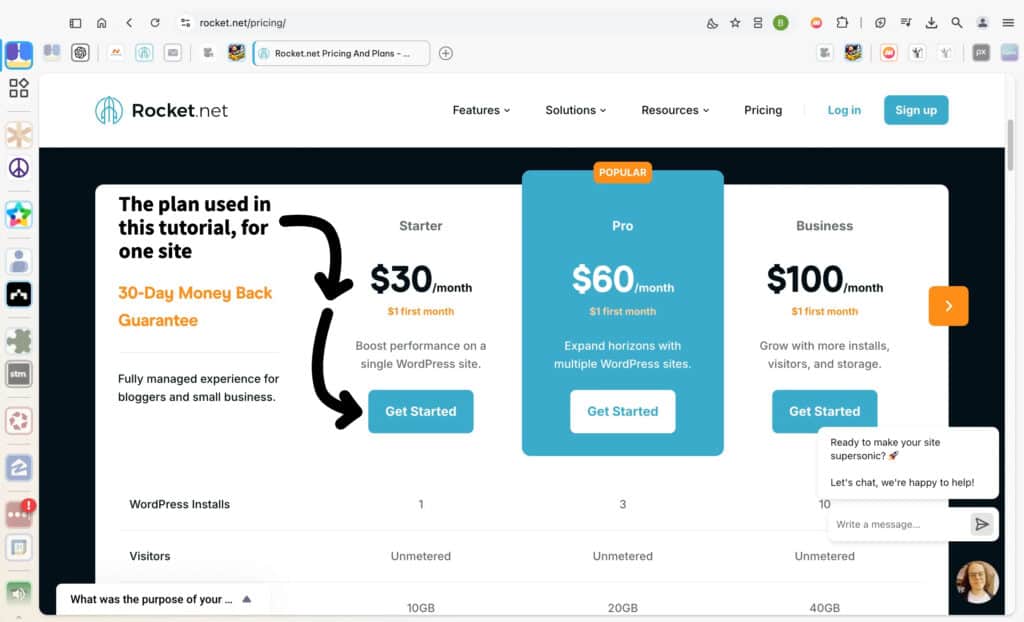
For this tutorial, the Starter plan is recommended as it’s optimized for a single WordPress site. This plan provides excellent performance and includes essential features such as unmetered visitors, free SSL, malware protection, and automated daily backups.
Click the “Get Started” button under the Starter plan, as indicated in the screenshot, to proceed. This ensures you’re following along with the same setup demonstrated in this guide.
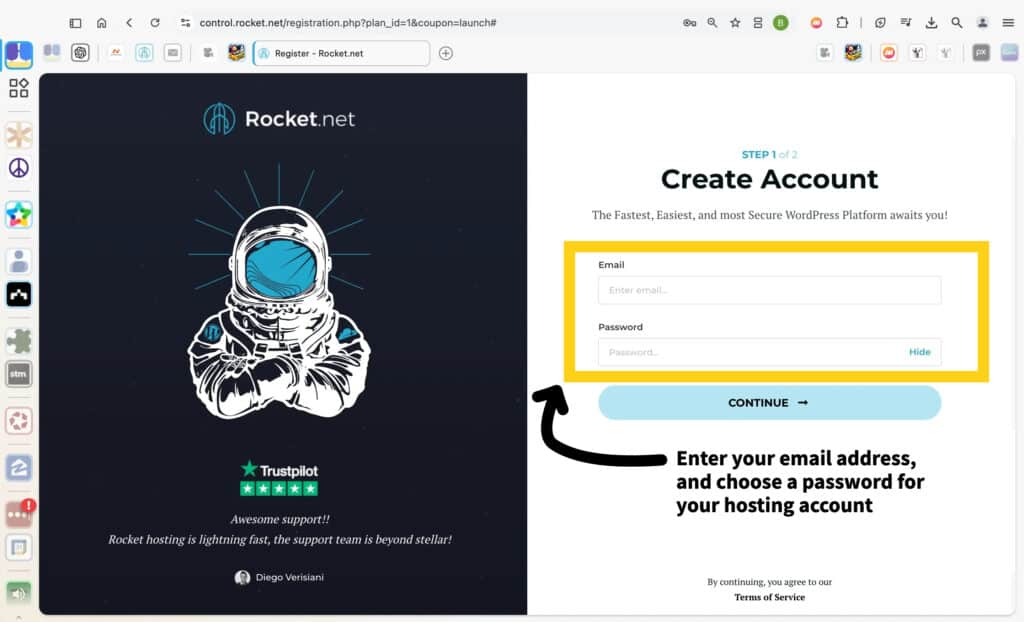
On the account creation page, enter your email address and set a secure password for your hosting account. This is the first step in setting up your Rocket.net hosting.
Make sure your password is strong and secure. Using a password manager like LastPass can help you generate and store a strong password. Once you’ve filled in both fields, click the “Continue” button to move forward.
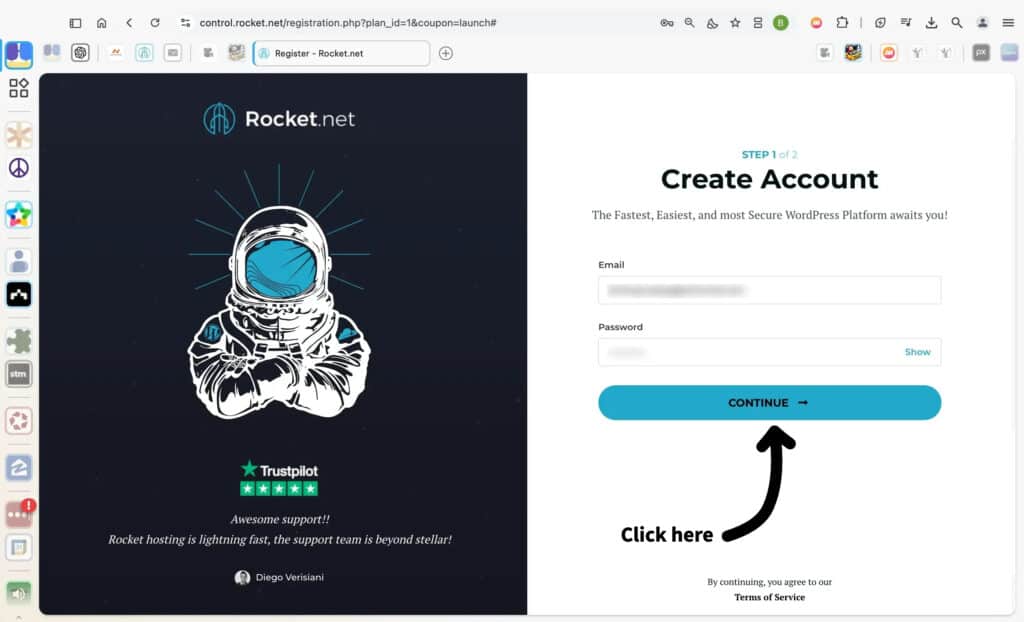
Double-check the email address and password you’ve entered on the account creation form. Once you’re confident the information is correct, click the “Continue” button to proceed to the next step.
This action will initiate the account setup process, bringing you closer to finalizing your hosting plan. If needed, you can click the “Show” option to review your password for accuracy before continuing.
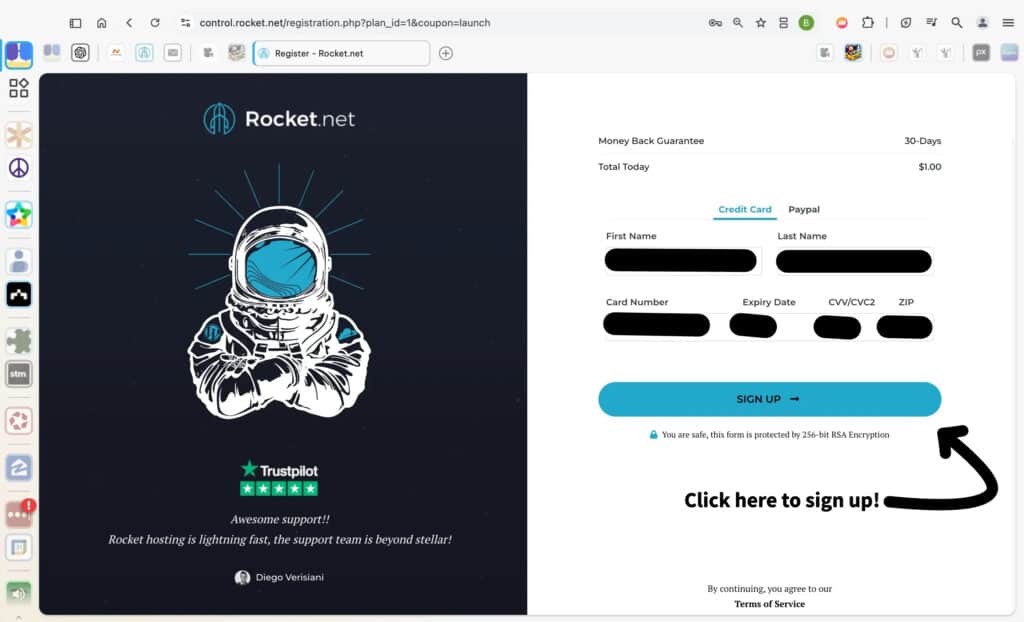
Enter your first and last name in the billing section—unless, of course, you’re secretly Neil Armstrong 👨🚀, boldly setting foot 🚀 where no WordPress site has gone before! 🤣🤣
Next, choose your payment method, either credit card or PayPal. If you’re paying by card, fill in your card number, expiry date, CVV, and ZIP code.
Pro tip: skip trying 1234 1234 1234 1234 unless your goal is to orbit planet Decline. 🫤🤣
Double-check everything to ensure it’s accurate (and free of any emojis), then proceed to the next step. You’ll see a $1 coupon applied, which is a standard offer for new Rocket.net customers—an easy way to kickstart your website journey without burning through your budget.

Once all your details are entered—name, payment method, and billing information—double-check for accuracy. When you’re confident everything is correct, click the Sign Up button to complete your registration. Rocket.net uses 256-bit RSA encryption to secure your payment details, so you can proceed confidently.
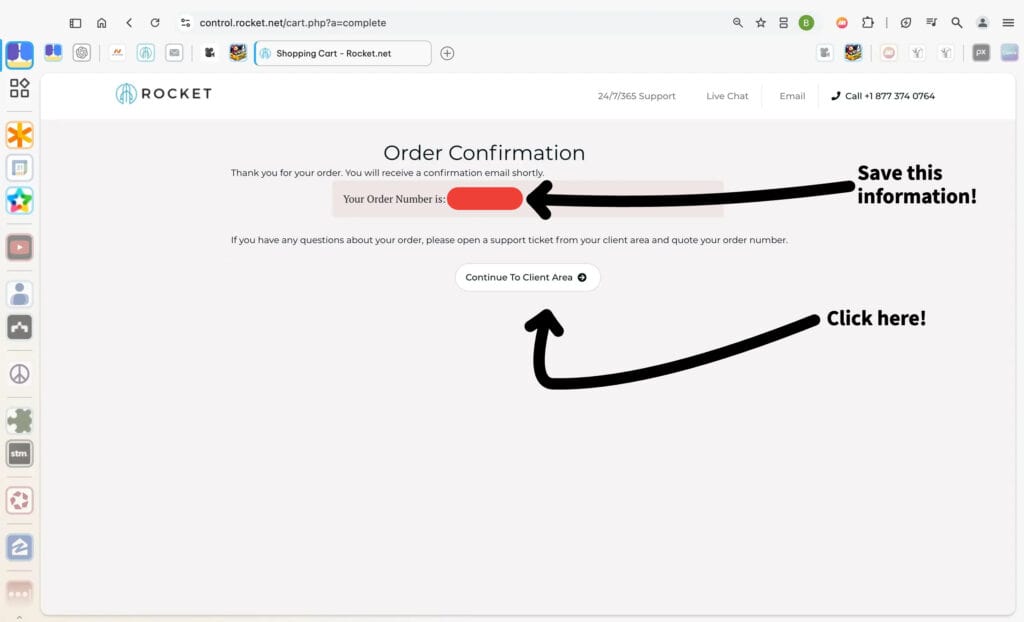
This page confirms your order with Rocket.net. Your Order Number is displayed prominently—be sure to save it somewhere secure. This number will be important if you need to contact support or reference your account in the future.
After saving your order number, click the Continue to Client Area button to proceed to your account dashboard. From there, you can begin setting up and managing your hosting.
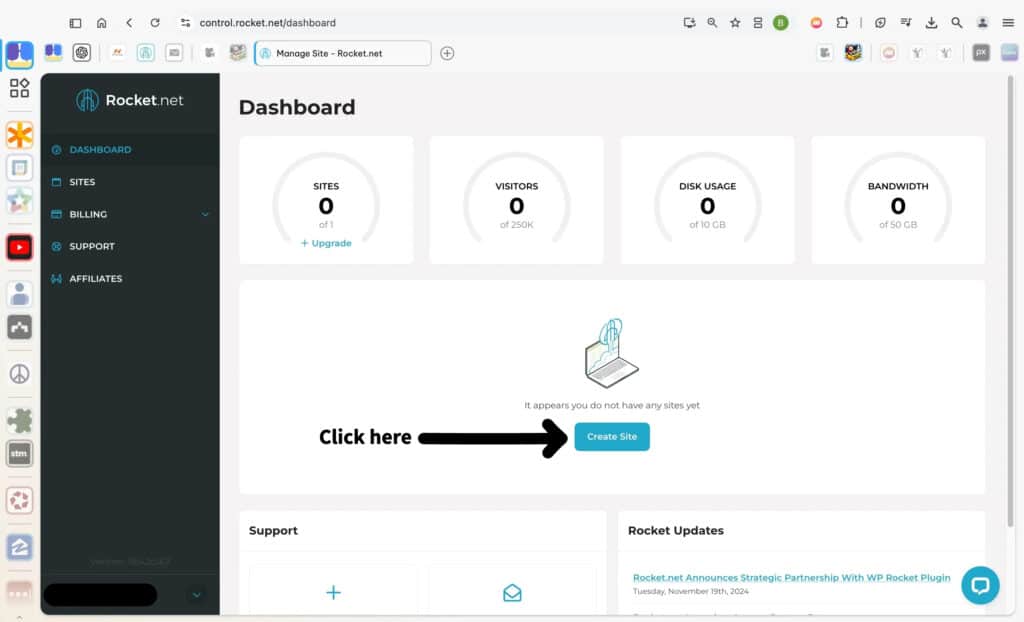
You’re now in the Rocket.net dashboard, ready to start setting up your first WordPress site. Click the Create Site button in the center of the screen, as shown in the screenshot.
This action will guide you through the site creation process, helping you get your website live and ready for customization. Everything is designed to make this process smooth and efficient, so follow the prompts to move forward.
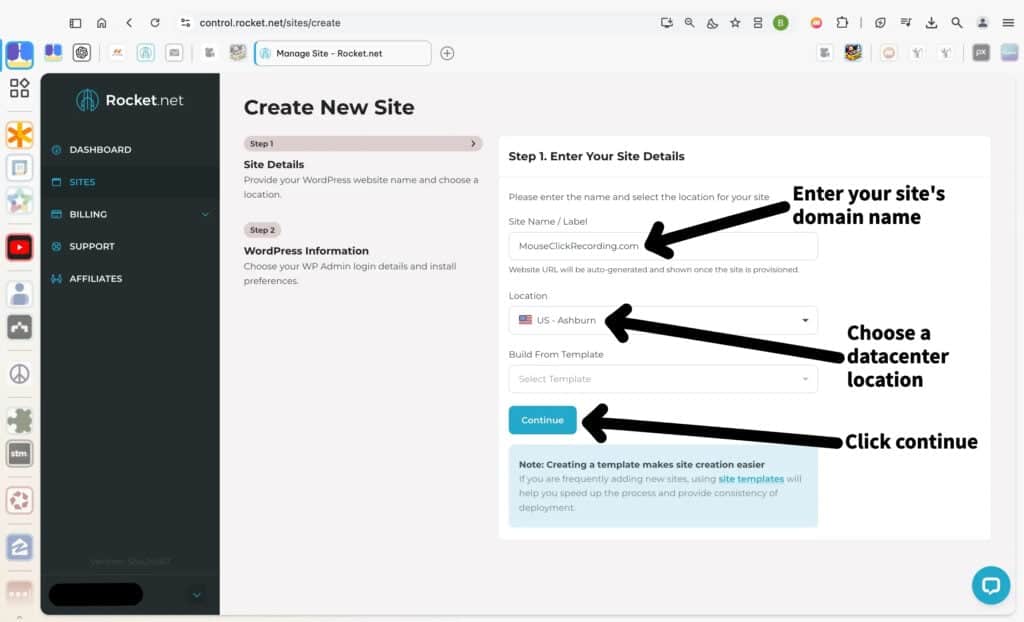
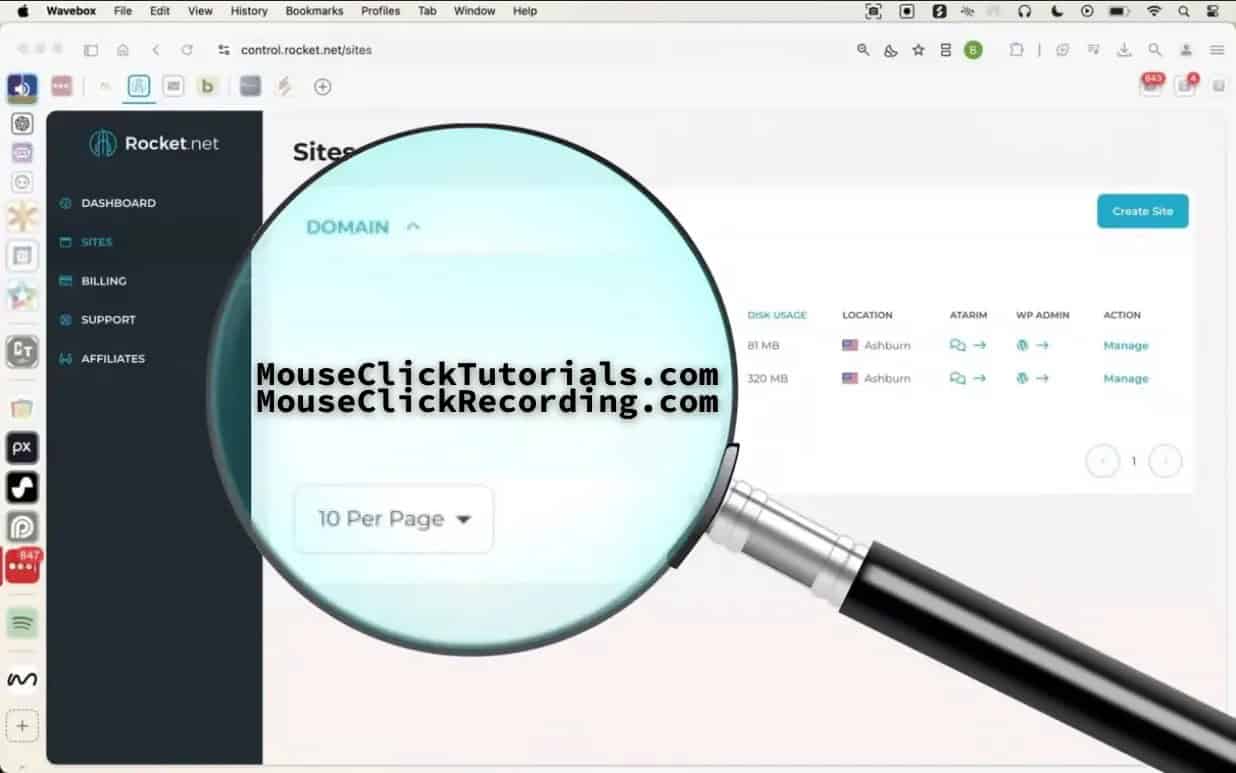
Enter the name for your site in the Site Name/Label field. This can be your domain name or any label that helps you quickly recognize the site in your dashboard. For example, “MouseClickRecording.com” is used here.
Choose the Location that matches where your primary audience is located. Selecting a datacenter close to your visitors ensures faster loading speeds for your site.
If you have a pre-configured Template, you can select it from the dropdown menu to streamline the setup. If not, you can proceed without one and build from scratch.
When all fields are filled out, click the Continue button to move to the next step of the setup process.
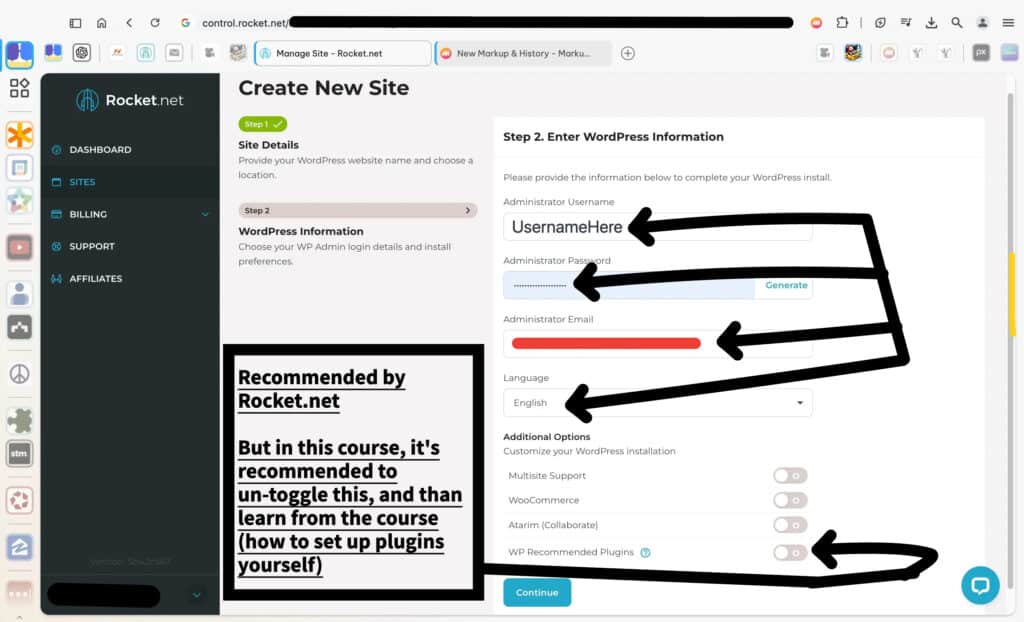
In this step, you’ll enter the essential details for your WordPress installation.
Start by creating your Administrator Username. This will be the username you’ll use to log in to your WordPress dashboard. Avoid using “Admin” or other generic usernames for better security.
Next, set a strong Administrator Password. You can type your own or click Generate to let Rocket.net create a secure one.
Then enter your Administrator Email address.
This email is tied to your Admin User account for password recovery and login notifications. At the same time, WordPress also uses it as the site’s initial Administration Email (in General Settings). In other words: the same address starts out doing double duty — it’s for your user and for your site. Later, you can separate them if you want, for example:
-
keep your user email private (for login/recovery), and
-
update the site’s Administration Email to a domain address (like
info@yourwebsite.com) or even hand it off to an employee if your site grows.
Choose your site’s Language from the dropdown menu. The default is English, but you can select another if needed.
At the bottom, you’ll see an option to toggle WP Recommended Plugins. While Rocket.net recommends enabling this to streamline setup, in this course it’s suggested to leave it off. You’ll learn how to manually install and configure plugins later, giving you a more hands-on understanding of WordPress customization.
When all fields are filled out, click Continue to move to the next step in the setup process.
Now that you’ve entered all the required WordPress setup details, you’re ready to move forward. Simply click the Continue button at the bottom of the page to finish this part of the process.
At this point, your hosting account is set up, and your domain was configured in the last tutorial. However, the two aren’t connected yet. Until they are, your site won’t be accessible online. In the next tutorial, you’ll learn how to link your domain to your hosting so your site can go live.

Check out Rocket.net!
I don't earn commissions from this link
I may earn commissions from this link
Before Buying Online
Before You Buy: Know the (Affiliate Marketing) Industry's Games
Hidden Incentives in Online Recommendations
A lot of content online looks like it’s meant to be helpful. It might be labeled as a review, a list of top picks, or just a casual post like “I found this and it’s cool.” But in many cases, that content isn’t created to help someone make a better decision. It’s created to earn money through affiliate commissions.
What affiliate links are for
Affiliate links exist to support content by allowing someone to earn a commission when a product or service is purchased through a link they’ve shared. That’s the whole purpose. It doesn’t add cost to the buyer—and when used responsibly, it can reward content that genuinely helps.
The problem is how these links influence what gets recommended in the first place.
How incentives distort content
Some affiliate content is shaped by payouts—where higher-paying products and services get pushed harder. But more often, the problem is something else entirely: laziness.
A lot of affiliate content isn’t the result of research or thoughtful guidance. It’s based on whatever’s convenient. A product or service is already popular, someone else is promoting it, or it has an affiliate program—so it gets plugged in without much thought. There’s no testing, no real consideration of what would actually help the audience, and no accountability.
In these cases, the product or service itself might be perfectly fine. But the recommendation isn’t grounded in anything useful, and that’s what creates the disconnect. It leads to content that promotes whatever’s easiest to monetize, skips stronger alternatives that require more effort to discover, avoids mentioning downsides that could reduce clicks, and simply recycles whatever’s already trending among other affiliates.
It’s not about how much something pays. It’s about why it’s being recommended.
A product or service that pays well isn’t the problem if it actually fits the use case. But when it’s included just because it earns—or because it was the easiest thing to grab—that’s not a real recommendation. It’s content that exists to sell, not to help.
How to recognize honest affiliate content
Genuine recommendations feel different. Affiliate links are disclosed openly. Pros and cons are explained clearly, not glossed over. The explanation comes before the link. Alternatives that don’t offer commissions are still mentioned when they’re relevant. And the content doesn’t rely on pressure, urgency, or sales language to get someone to click.
When an affiliate link supports a thoughtful recommendation, it adds value. When the link is the reason something was included in the first place, the integrity of the content falls apart.
How this site handles it
Affiliate links are used here—but never as the reason something gets recommended. Some products and services pay nothing. Others pay less than their competitors. If they actually work, solve a real problem, and serve the audience this site is built for, they get included.
Payouts don’t determine what’s shown. Usefulness, reliability, and fit for the audience do.
Every recommendation on this site includes two links side by side: a clearly marked affiliate link, and a non-affiliate version. That way, anyone who wants to support the site can do so with one click—without being forced into it. And anyone who doesn’t can still access the same product or service without friction.
No popups, no fake scarcity, and no pressure. Just clear information and real options — presented with your time and trust in mind.
How to Choose Web Hosting That Won’t Screw You Later
Why Hosting Choices Can Look Fine at First — and Still Cost You Later
Many web hosting recommendations are influenced by affiliate incentives. That influence often shapes what gets promoted — not based on what’s reliable or useful, but based on what earns commissions. To understand how that works, scroll up to Hidden Incentives in Online Recommendations.
Once that’s clear, it becomes easier to recognize common patterns in how web hosting is sold — especially when it comes to pricing, positioning, and long-term reliability.
What Is Web Hosting, Really?
Web hosting is infrastructure. It’s what keeps a website live, accessible, and functioning smoothly. It stores the site’s files, manages uptime and speed, and often determines how frustrating things get when something breaks.
A good host does its job in the background — quietly, reliably.
A bad host appears fine at first — then slowly drags performance down through downtime, slowness, or support failures.
And often, that decline is masked early on by extra-friendly onboarding.
Sales chat is responsive. Setup support feels hands-on. It’s all about getting the account active and the site online fast. But after that grace period — often right after the refund window passes — service quality shifts.
Some companies do this deliberately: prioritize new customers, while gradually neglecting existing ones.
Others just aren’t equipped to deliver consistent support at scale. Either way, the pattern is common — especially with shared hosting.
Why Shared Hosting Gets Promoted So Heavily
Shared hosting is one of the most promoted types of hosting — not because it’s reliable, but because it’s easy to sell and easy to profit from. Many hosting companies offer shared plans as a low-cost entry point. And many of those companies run affiliate programs where commissions are paid out just for generating a new customer — regardless of which plan the customer signs up for.
That means affiliates often push the cheapest plan available, because it’s easier to convert — even though the payout is the same (or nearly the same) as recommending a better option. A $2.99/month shared hosting plan can still result in a $100+ commission, because the hosting company expects that customer to stick around long enough to cover the cost.
This dynamic is why shared hosting dominates most “best web host” lists — not because it’s actually good, but because it converts easily and pays well.
Why This Site Rejects Shared Hosting Entirely
MouseClickTutorials.com does not recommend shared hosting under any circumstances — not for beginners, not for temporary projects, not for anyone.
Even when managed by capable companies, shared hosting remains too unstable, too crowded, and too limited to serve as reliable infrastructure. It introduces risks and headaches that are completely avoidable with better hosting types. The environment is unpredictable, the performance is inconsistent, and the support is often too generic to be helpful when something goes wrong.
This position isn’t based on theory — it’s based on what actually happens when shared servers are overloaded, misconfigured, or mismanaged. And even without bad intent, it’s incredibly easy for problems to creep in unnoticed. One site’s spike in traffic or bad code can affect everyone else on the server.
Shared hosting is one of the biggest reasons new site owners feel like they “did something wrong,” when the real issue is invisible under the hood. That’s not a foundation worth building on.
The Issue with “Free” Domains
Many hosting companies advertise a “free domain” when signing up for a plan. But in most cases, the domain offer includes conditions:
-
The domain may be registered in the host’s name rather than the customer’s.
-
It may be locked or tied to the hosting plan, making it difficult or expensive to transfer.
-
The domain becomes the anchor keeping people on subpar hosting just to keep their site online.
The fix: always register domains separately with a trusted registrar like Namecheap. That ensures full ownership and makes it easy to change hosts at any time.
Why Cheap Hosting Isn’t Really Cheap
Low introductory prices like $2.99/month are usually misleading:
-
Most require paying 2–3 years upfront to get that rate
-
Renewal rates after the initial term are much higher
-
Core features like backups, SSL, and live support may cost extra — or be limited
-
“Unlimited” plans often include vague usage caps that throttle performance as sites grow
What seems cheap upfront becomes expensive over time — in stress, in missed revenue, and in wasted hours troubleshooting problems that wouldn’t exist on better infrastructure.
And that’s not just a figure of speech. If a site owner spends 40+ hours a year dealing with slow load times, broken features, unclear issues, and back-and-forths with bad support — and if that person would be paid even minimum wage for that time — the true cost of “cheap” hosting becomes obvious.
The value of reliable hosting isn’t just technical. It’s economic. It protects time, momentum, and peace of mind.
Understanding Hosting Types — and Why This Site Only Recommends Some
There’s no universal “best,” but some types of hosting are far better suited for actual website owners — and some should be avoided entirely. Here’s a breakdown:
Shared Hosting
Low-cost, low-quality. Unpredictable performance. Limited scalability.
Often oversold and oversaturated. Even beginners should avoid it.
Managed WordPress Hosting
Built specifically for WordPress. Handles caching, updates, backups, and security automatically.
Fast, secure, and low-maintenance — ideal for most creators, freelancers, and business owners.
This is the default recommendation for a reason.
VPS Hosting (Virtual Private Server)
A private slice of a physical server. More control and flexibility, but also more responsibility.
Best for those with technical experience or specific configuration needs.
Cloud Hosting
Highly scalable and fast — if fully managed. If unmanaged, it can become overly complex.
Great for ecommerce, SaaS, or platforms expecting rapid growth, as long as the host handles the technical side.
Dedicated Hosting
An entire server for one user. Very powerful, very expensive.
Best reserved for advanced use cases with high traffic or strict infrastructure needs.
Colocation
The highest tier — full control over physical hardware inside a rented datacenter rack.
Used for enterprise infrastructure, compliance requirements, or custom network architecture.
Not relevant for most site owners.
What Actually Makes Sense for Most People
For most websites — especially anything built on WordPress — managed WordPress hosting strikes the right balance. It’s fast, secure, and far easier to manage than alternatives that require technical upkeep.
There are more powerful hosting options for those running complex infrastructure or custom apps, but managed WordPress hosting covers the needs of most creators, freelancers, small businesses, and growing projects — without the stress.
The best managed hosts don’t just check boxes. They eliminate problems before they happen.
They don’t disappear when support is needed. They don’t nickel-and-dime for features.
They just make the site work — and keep it working.
That’s the experience most people are actually looking for. And that’s the experience this site teaches people how to build toward.
Defining Your Web Hosting Needs
Hosting Types, Use Cases, and a Reliable Default
Why Your Host Isn’t Just a Checkbox — and What Actually Works for Most People
Most people picking web hosting treat it like a quick checkbox.
Domain, check. Hosting, check. Done.
But your hosting provider determines how fast your site loads, how often it breaks, how secure it stays, and how painful things get when something goes wrong.
It’s infrastructure — not a formality.
And one type of hosting still gets pushed far too often — especially by affiliate blogs chasing easy commissions.
Shared Hosting
This is where MouseClickTutorials.com draws a hard line.
Shared hosting is the $2.99/month pitch that sounds beginner-friendly… but quietly causes more damage than most new site owners can spot. Your site gets dropped into a crowded server with hundreds or thousands of others, all fighting for the same limited resources.
If another site spikes in traffic or runs unstable code, your site slows down — or goes down.
Support is slow, vague, and scripted.
Problems get blamed on you, with upgrade nudges as the default fix.
It often looks fine at first. That’s the problem.
When your site slows down or glitches later, you assume it’s something you did wrong.
But it’s not. It’s the hosting.
This site does not recommend shared hosting. Not for beginners. Not for anyone. Not ever.
Managed WordPress Hosting
This is the recommended path for most people building on WordPress.
Managed WordPress hosting is built to remove technical headaches. It handles backups, caching, updates, and security automatically — so you don’t need extra plugins just to keep things stable. The best providers offer fast performance and platform-aware support teams who actually know WordPress.
It’s low-maintenance. High-reliability.
And it’s the default recommendation here because it actually works.
VPS Hosting
A virtual private server (VPS) gives you more control and power — but also more technical responsibility.
You manage server setup, patches, security, and updates.
It’s great for developers and experienced users.
It’s not ideal for beginners or creators who want to focus on building content, not managing infrastructure.
Cloud Hosting
Cloud hosting can be powerful, scalable, and efficient — if it’s fully managed.
Otherwise, it comes with complexity most people don’t want.
Server configuration, cost optimization, scaling logic — it’s easy to get lost in the weeds unless the platform handles those pieces for you.
Used well, cloud hosting is a strong choice for fast-growing platforms, ecommerce sites, or custom apps. But for a first site or general-purpose WordPress site, it’s often overkill.
Dedicated Hosting
Dedicated hosting gives you your own physical server — with total control and no resource sharing.
It’s powerful and expensive, and usually reserved for specialized use cases: high-traffic apps, large media platforms, or advanced infrastructure stacks.
It’s not the place to start unless you already know exactly why you need it.
The Reliable Default
For most people using WordPress — creators, freelancers, educators, business owners — managed WordPress hosting is the most useful path forward.
It’s fast. It’s secure. It scales without stress.
And it keeps your site online, protected, and supported — without you needing to touch the backend.
That’s what this site recommends.
That’s what this site teaches.
Because it actually works.
Why Rocket.net is Recommended for Managed WordPress Hosting
1. Specialized WordPress Hosting: Why Rocket.net is a Perfect Fit
2. Blazing Fast Performance: Why Rocket.net Prioritizes Speed
3. Comprehensive Security: Why Rocket.net Protects Your Site
4. Hassle-Free Management: Why Rocket.net is Easy to Use
Check out the complete setup tutorial here →
Commissions will not be earned from this link.
*Not Monetized
Commissions will not be earned from this link.
*Not Monetized
Commissions may be earned from this link.
*Monetized
When Managed Hosting Isn’t Enough
Other Hosts to Consider
Rocket.net is the recommended starting point for most users — it’s fast, secure, and built specifically for WordPress. It handles speed, stability, and security without overwhelming you with backend tasks.
But if you’re building something more complex, running multiple applications, or just want to understand what else is out there, here are a few other hosts worth knowing about.
These hosts are grouped by how much control and infrastructure complexity they offer — starting with other options in the same managed WordPress category, then expanding into VPS, full-stack platforms, and finally, enterprise-level hosting.
Managed WordPress (Same Tier, Different Strength)
Templ.io
Templ.io is another managed WordPress host — in the same category as Rocket.net. While Rocket.net is the top recommendation here, Templ.io stands out for one reason: their support team is more willing to assist with technical issues at the code level.
If a plugin breaks layout or a script throws an error, they may help you investigate what’s going wrong. They won’t write your code, but they’ll go deeper than most.
Use if you want managed WordPress hosting with an extra layer of technical support — without leaving the simplicity of this hosting tier.
Managed VPS (More control, broader use cases)
KnownHost
KnownHost gives you full server-level access through managed VPS hosting. You can install custom software, run multiple apps, configure email, and handle more advanced workflows than a WordPress-only host would allow.
Some plans still use cPanel, while others may include DirectAdmin — check the specifics before choosing.
Use if you’re managing more than just a WordPress site, or need flexibility that managed WordPress doesn’t offer.
Managed VPS (cPanel-focused, long-term scalability)
Hivelocity
Hivelocity offers managed VPS hosting with strong cPanel support, full root access, and upgrade paths into dedicated servers or colocation — all without locking you into a proprietary dashboard.
You’re not limited to WordPress, and you don’t need to give up traditional tools.
Use if you want a cPanel-friendly platform with the freedom to run mixed environments — and the ability to scale far beyond VPS later if needed.
Cloud-Native Performance Hosting
Servebolt
Servebolt doesn’t follow the VPS/cPanel playbook. It’s built from the ground up for speed — especially for dynamic sites like WordPress or WooCommerce.
They manage performance at the stack level: memory allocation, rendering optimization, backend tuning — all handled by their proprietary infrastructure.
Use if you’re running a high-traffic or ecommerce-heavy site where raw speed is a top priority and you’re okay with skipping traditional server tools.
Dedicated Servers (Unmanaged, full control)
Hetzner
Hetzner is known for high performance at extremely competitive prices — especially in the EU. They offer both dedicated hardware and cloud instances, but everything is self-managed. No hand-holding, no support for setup or configuration.
It’s powerful, but entirely your responsibility.
Use if you know what you’re doing and want total ownership of your environment for speed, scale, or regulatory control.
Colocation (Enterprise-grade physical infrastructure)
Colocation Providers
Colocation means you own the hardware. You rent rack space in a datacenter — they supply power, cooling, and bandwidth, but everything else is up to you.
This isn’t a web hosting plan — it’s raw infrastructure.
Used by SaaS companies, media platforms, and organizations with strict compliance, latency, or scaling needs.
Providers in this space include Hivelocity, PhoenixNAP, Equinix, Digital Realty, ColoCrossing, and OVHcloud.
Use if you already know exactly why you need this. If you’re not sure, you don’t.
Recommended Resources Review Process
Traffic Light Rating System: Overview
Recommended resources are rated using a system inspired by traffic lights. This system makes it easier to find what’s actually useful for building websites, streamlining workflows, and boosting productivity across different areas. Resources are evaluated for their quality, reliability, and how much they benefit MouseClickTutorials’ audience.
Green Light resources are intentionally few. Very few resources are truly Green Light worthy, and from those, only a small mix is chosen. That’s deliberate — people only have so much time, energy, and money, so this tier exists to serve the best interests of MouseClickTutorials’ audience. If a resource appears here, it’s because it delivers proven value for those learning and building along with this site.
Yellow Light resources are also excellent, but not all are meant for the very top. Most wouldn’t make the cut for Green Light, though a few could. Their placement here doesn’t take away their value — it reflects the balance between curation, context, and the need to keep Green Light small and focused. Yellow Light provides more worthwhile resources that can still help this audience, without stretching the top tier too far.

Green Light Resources

Wavebox
Wavebox
Fileside
Fileside
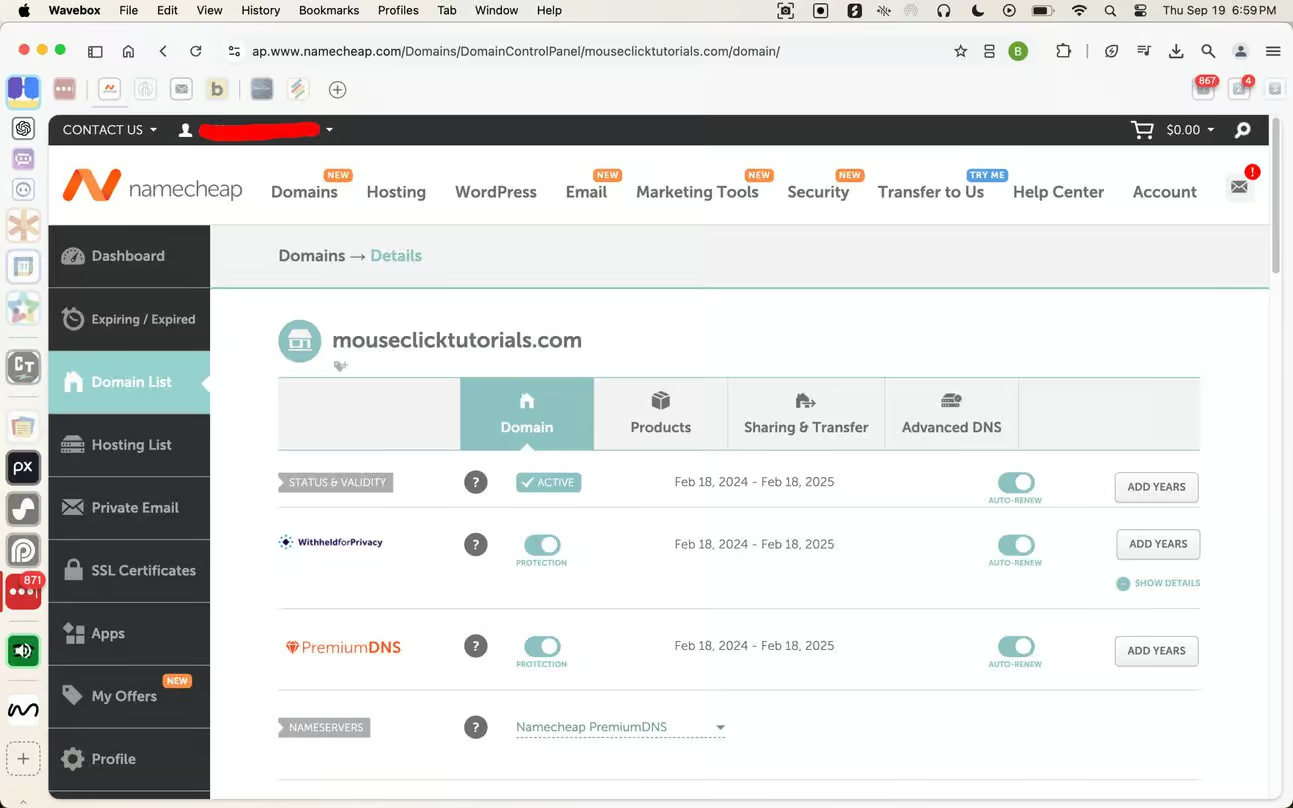
Namecheap
Namecheap
Rocket.net
Rocket.net
Bricks Builder
Bricks Builder
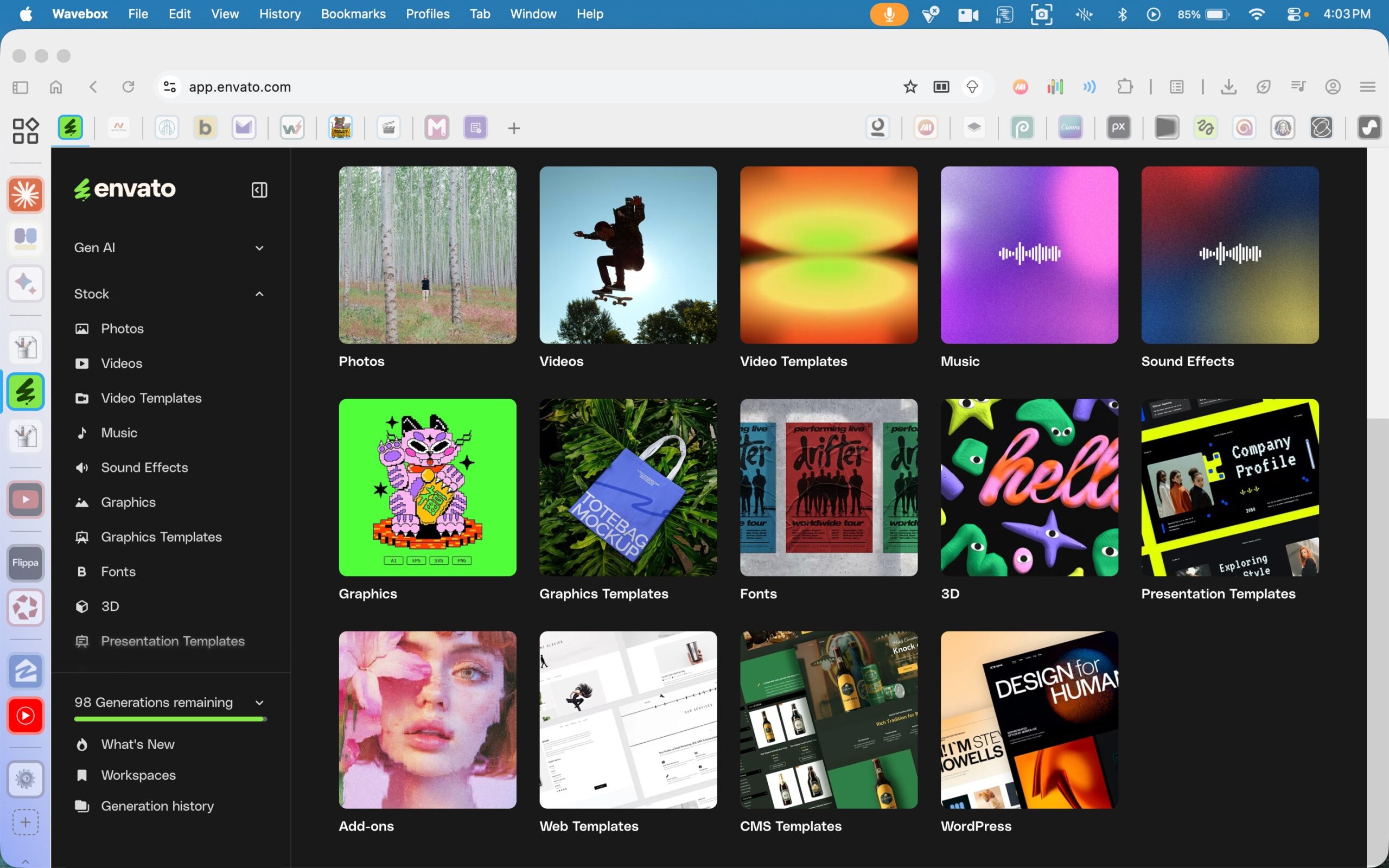
Envato
Envato
InWorld AI
*** Inworld AI produces spoken voice only — not singing. This song was made with Suno.
InWorld AI

Suno
Suno

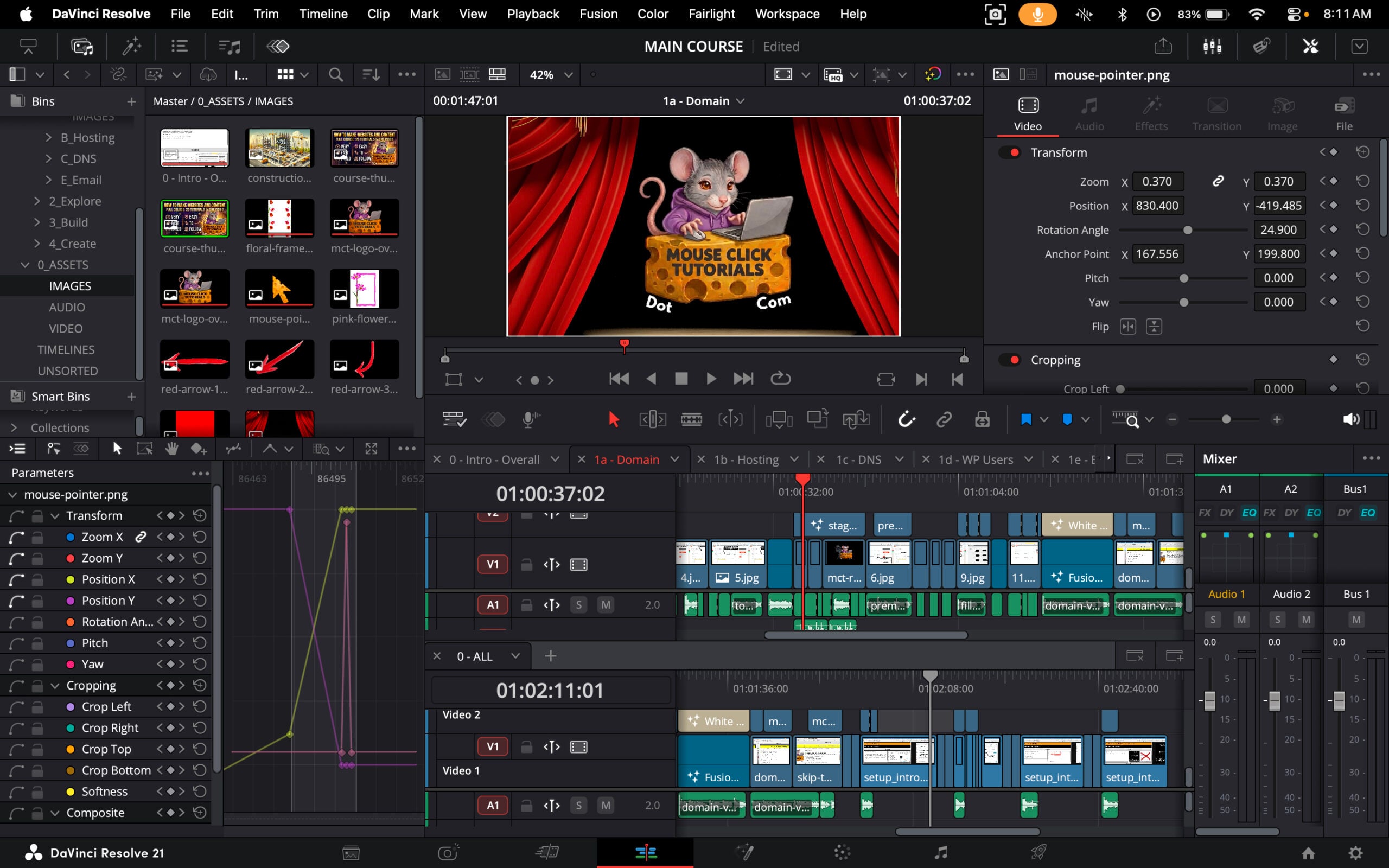
Davinci Resolve
Davinci Resolve
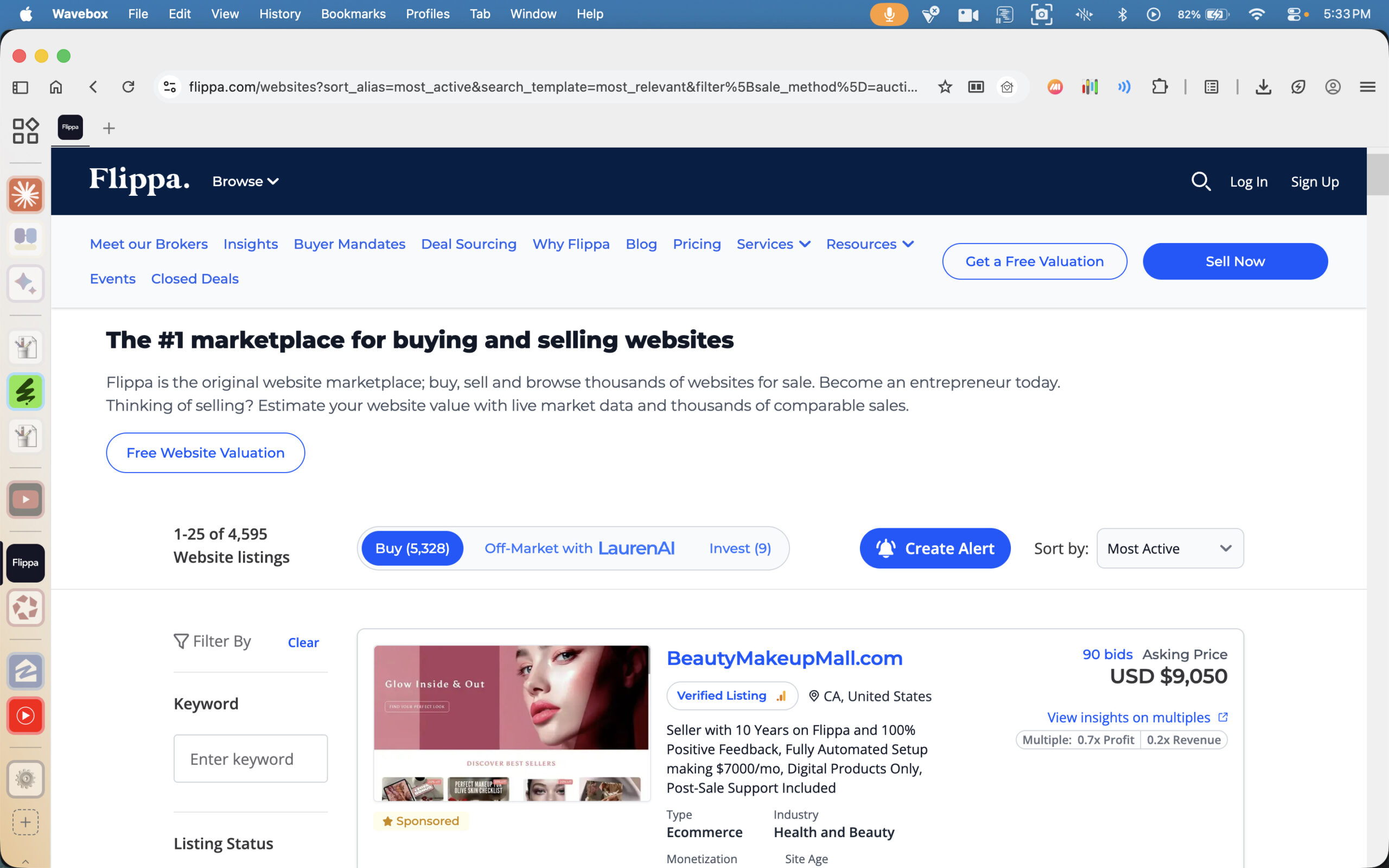
Flippa
Flippa

Yellow Light Resources
Lorem ipsum dolor sit amet, consectetur adipiscing elit. Sed do eiusmod tempor incididunt ut labore et dolore magna aliqua. Ut enim ad minim veniam, quis nostrud exercitation ullamco laboris nisi ut aliquip ex ea commodo consequat. Duis aute irure dolor in reprehenderit in voluptate velit esse cillum dolore eu fugiat nulla pariatur. Excepteur sint occaecat cupidatat non proident, sunt in culpa qui officia deserunt mollit anim id est laborum.
Curabitur pretium tincidunt lacus. Nulla gravida orci a odio. Nullam varius, turpis et commodo pharetra, est eros bibendum elit, nec luctus magna felis sollicitudin mauris. Integer in mauris eu nibh euismod gravida. Duis ac tellus et risus vulputate vehicula. Donec lobortis risus a elit. Etiam tempor. Ut ullamcorper, ligula eu tempor congue, eros est euismod turpis, id tincidunt sapien risus a quam. Maecenas fermentum consequat mi. Donec fermentum. Pellentesque malesuada nulla a mi. Duis sapien nunc, commodo et, interdum suscipit, sollicitudin et, dolor. Pellentesque habitant morbi tristique senectus et netus et malesuada fames ac turpis egestas.
Content goes here .. (2)
Content goes here .. (2)
- Canva
- Description: blah blah blah blah blah
- Internal Review: None
- Regular Link: Here
- Affiliate Link: None
- Something
- Something
- Canva
Has this website helped you?
If you found this site useful, please tell others! 🙏
The content on this site is built around clarity, purpose, and respect for the reader’s time. Tutorials are designed to support real progress — setting up the essentials, understanding how the digital side of things actually works, choosing reliable products and services, building a site aligned with personal goals, and learning how to earn ethically online.
If something here proves useful, feel free to share it with anyone who might benefit. Thoughtful recommendations help good resources reach more people trying to build online with integrity.
No email newsletter. No pop-ups. No “sign up to unlock.” That choice is intentional.
Forced funnels, artificial urgency, and inbox campaigns dressed up as generosity are not part of this model. Content stays fully accessible — no gatekeeping, no gimmicks — because real value shouldn’t come with strings attached. Trust is earned through usefulness, not pressure.
Sustainable growth comes from honest content, ethical recommendations, and long-term relationships. That’s the model here, and it’s the only one worth building on.
Contact MouseClickTutorials